NVIDIA GeForce Experience SDK
- Version: 1.0.0.d2a45f0d
- Built against GFE Version: 3.9.0.37
- GeForce Experience minimum version: 3.8
- See Changelog
At a Glance
The GeForce SDK (GfeSDK) is a means for games to integrate with ShadowPlay Highlights allowing them to capture videos and screenshots and present the resulting highlights back to users for viewing and sharing. GfeSDK will add other features over time that benefit from games and applications working in concert with GFE functionality.

Software Stack

An application integrates with the GfeSDK via either the provided Unreal Engine 4 plug-in, C++ interface, or C interface. This integration, via the SDK, calls a compatible GFE 3.0 release.
The developer (or associated publisher) distributes the application (including associated SDK libraries).
NVIDIA distributes a GfeSDK package coupled with GfeSDK-compatible GFE releases. GFE maintains backwards SDK-compatibility; games integrated with older SDKs work with newer GFE releases.
GfeSDK Package
The distribution will look like the following
Compiling And Linking
To compile, add the ./include (not the ./include/gfesdk) directory to the compiler's list of includes. The import libraries are found in the ./lib folder and can be used to link the symbols into the game's executable. The proper GfeSDK.dll file will need to be distributed with the game in a place that the game can find it.
The C++ bindings are currently distributed in header-only form to avoid ABI incompatibilities between different compiler versions. The linking and include steps are the same.
Using GfeSDK
Creation and destruction of an SDK instance is a prerequisite to making calls to the SDK. The means of creating and destroying an instance depend on which integration mechanism the client employs:
See Highlights header documentation
Creation and Release
C++ Bindings
// After using GfeSDK
C API
// After using GfeSDK
Request Permissions
The Create call will inform the app if one or more scopes require user permission. If so, make this call. It will display the overlay UI.
C++ Bindings
C API
Configure Highlights
This only needs to happen once ever. It is persistent. It could even happen during game installation.
C++ Bindings
C API
Groups and Saving Highlights
C++ Bindings
C API
Open Highlight Summary
C++ Bindings
C API
Concepts
The GfeSDK is composed of two parts, the client/app, and the backend/server. This distribution contains GfeSDK.dll which represents the client/app part. The end-user downloads GFE onto their machine. The GFE package includes the backend pieces necessary to support the calls coming from the client. See Versioning for more information regarding this communication.
Calls made will be serialized. Therefore, if the app makes two consecutive calls to NVGSDK_Highlights_OpenGroup and then either NVGSDK_Highlights_SetVideoHighlight or NVGSDK_Highlights_SetScreenshotHighlight, before receiving the callback from open group, the set highlight call will function normally. If open group succeeded, then the set highlights calls will succeed as well. If it failed, the set highlights calls will fail, as there will be no valid group to assign them to.
Strings
All strings are to be provided in single-byte width, UTF-8 encoded.
Versioning
Because there are two different parts, and the client / user's machine may be mismatched at times, the game should be aware of the versioning system. It's GfeSDK's goal to make this as seamless as possible, but there could still be compatibility issues to be aware of.
The GfeSDK version contains 4 parts, MAJOR.MINOR.BUILD.HASH. The BUILD and HASH components are descriptive and don't have any effect on functionality. The MAJOR component identifies overall compatibility. If the client and server mismatch on the major version number, no communication is possible. There are no current plans to update from 1, breaking communication. The major version number gives a way to show incompatibility if the fundamental architecture of GFE ever changes. The minor version number indicates feature compatibility. When a new feature gets added / modified on the SDK, the minor version number will be bumped. This means that for older games / newer GFE installations, the game is simply missing out on newer features. This will generally not be a problem. For a game with a newer version of the GfeSDK, and a user with an older installation of GFE, some features may not function, and the user should be encouraged to update GFE.
With that in mind, here are the possible return values from NVGSDK_Create, with regards to versioning:
- NVGSDK_SUCCESS - Perfect version match
- NVGSDK_SUCCESS_OLD_GFE - Minor version mismatch. User has an older version of GFE installed. Newer features distributed by the game will not function properly until the user upgrades.
- NVGSDK_SUCCESS_OLD_SDK - Minor version mismatch. Game is distributing an older version of GfeSDK. Game could be missing out on latest features, but no compatibily issue.
- NVGSDK_ERR_GFE_VERSION - Major version mismatch. User has a GFE installation that predates the GfeSDK. User must upgrade to get functionality.
- NVGSDK_ERR_SDK_VERSION - Major version mismatch. GFE has changed fundamentally. There are no plans to do this. This is to cover all bases
Permissions
Certain actions require permission from the user. For example, recording video for Highlights requires the user to agree to the recording. To achieve this, the app must know what features it wishes to enable. It will pass these "scopes" into the NVGSDK_Create call via NVGSDK_CreateInputParams. Consider the typical Highlights case as an example. The app will pass in a list of the scopes NVGSDK_SCOPE_HIGHLIGHTS, NVGSDK_SCOPE_HIGHLIGHTS_VIDEO, and NVGSDK_SCOPE_SCREENSHOT. The first of these is required in order for any of the NVGSDK_Highlights_* calls to succeed and send a message to the server. It will allocate the resources required in the DLL and on the server in order to achieve this. The second of these permissions is required in order to capture video of the gameplay, and the final is to capture a screenshot.
The first time the user runs the game, and the game calls NVGSDK_Create(...), and passes in these three permissions, the game might receive back that NVGSDK_SCOPE_HIGHLIGHTS has been granted permission implicitly, but that NVGSDK_SCOPE_HIGHLIGHTS_VIDEO and NVGSDK_SCOPE_HIGHLIGHTS_SCREENSHOT currently have "must ask" permission. In other words, the game must ask GFE for permission to record video before it will succeed in doing so. To achieve this, the game will call NVGSDK_RequestPermissionsAsync with two scopes in the list, NVGSDK_SCOPE_HIGHLIGHTS_VIDEO and NVGSDK_SCOPE_HIGHLIGHTS_SCREENSHOT. It's not necessary to request permission for a scope that has implicitly been granted permission already.
The call to NVGSDK_RequestPermissions is required because it will trigger GFE to put up an In Game Overlay. The game might not want this to occur during NVGSDK_Create time. Once called, the user will see the overlay pop up, asking them for permission.

The async callback will be triggered as soon as the message is processed by the GFE backend. The user will be able to accept, deny, or defer the request. If the user accepts or denies the request, the app will recieve a NVGSDK_NOTIFICATION_PERMISSIONS_CHANGED notification with the results. If NVGSDK_RequestPermissionsAsync is called again when the permission is already granted or denied, the overlay will not be displayed a second time. The user can reverse their decision in either case later on in GFE3 on the games details page.
Asynchronous Calls
Most of the calls to GfeSDK are asynchronous. This is due to the client/server architecture described in Concepts. For each asynchronous call, a callback and an opaque void* context are passed in as arguments. If the app does not care or desire to know what happens to the call, is it fine to pass in NULL. If the app does care, supply a callback of the proper type, and optionally a pointer as a context to receive back during the callback.
The callbacks are properly typed. For callbacks that return nothing but the return value and context, a NVGSDK_EmptyCallback is passed in. For versions that do return data, a typed callback is passed in, such as NVGSDK_GetUILanguageCallback.
The callback will be called on one of three threads, depending on the situation. If NVGSDK_CreateInputParams::pollForCallbacks is set to false during creation, the callback will always occur on a GfeSDK controller thread. If the app desires callback to occur on their own thread, true is passed in instead. In that case, the callback will occur on the thread that calls NVGSDK_Poll. The exception is that during NVGSDK_Destroy, GfeSDK pushes out all remaining callbacks. If the app is awaiting any callbacks during this time, they will be called on the same thread that called NVGSDK_Destroy. Usually, this will be the same thread that calls NVGSDK_Poll, so it shouldn't cause any surprises, but it's something to be aware of. See Threading for more information
Note: There is currently a limitation in the GfeSDK backend that depends on game frames being rendered during certain API calls. Therefore, the game cannot block the render loop while awaiting an asynchronous callback. Doing so will result in a deadlock.
Notifications
In addition to the async callbacks that most of the APIs accept as an argument, the app can also register to recieve unsolicited notifications when certain events occur. For example, the app might want to know when the user can given / removed permission for recording video from the app, either through the permissions dialog, or via GFE3. See NVGSDK_CreateInputParams and NVGSDK_NotificationType
This notification will get called on either the GfeSDK callback thread, or the thread that calls NVGSDK_Poll, depending on params passed in to NVGSDK_Create. See Threading for more information.
Threading
There are two different threading models that may be used. The model used depends on the value passed in to NVGSDK_CreateInputParams
GfeSDK Controller Callback Model
In this model, all callbacks will occur as soon as they are processed on the internal GfeSDK callback thread.
Polling Model
The app can choose to use this model if it wants to take action during the callback that depend on being on the game loop. Callbacks are queued up, and executed when the app calls NVGSDK_Poll. This means that callbacks will be blocked indefinitely if that API is never called.
The exception occurs during NVGSDK_Destroy. Because the normal case is to make NVGSDK_Destroy and NVGSDK_Poll calls from the same thread, GfeSDK can't block and wait for another poll call. All remaining callbacks will be executed during NVGSDK_Destroy. See Asynchronous Calls for more info.
In Game Overlay
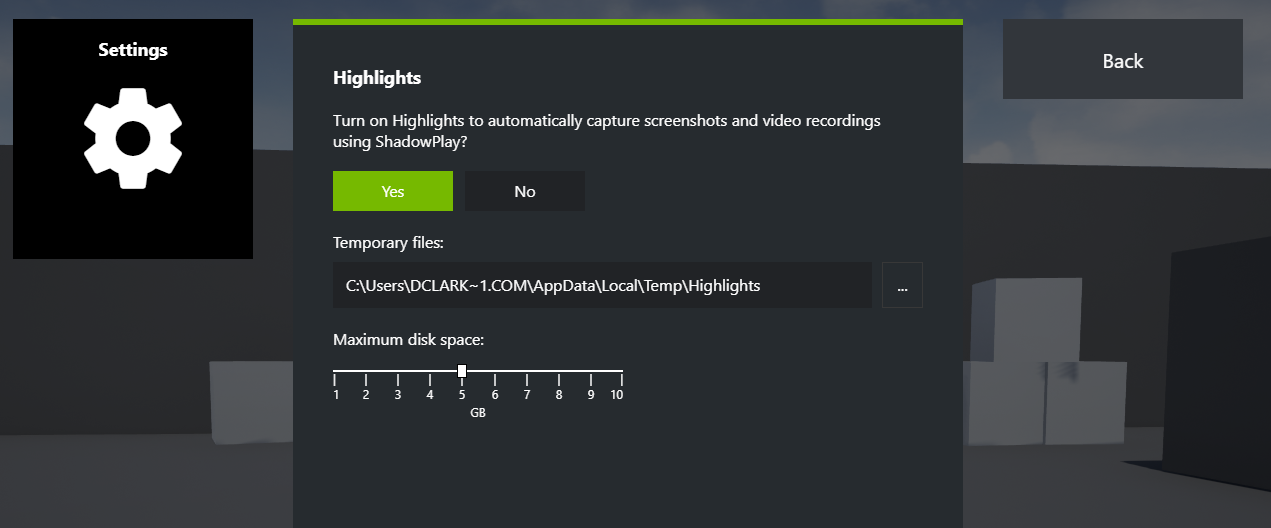
The In-Game overlay can be used by the user to change Highlights settings, and view Highlights that have been saved to the gallery. It's also used to display the permissions dialog from NVGSDK_RequestPermissionsAsync, and the group summary from NVGSDK_OpenGroupSummaryAsync. The user can open it up by themselves using the default keybinding Alt+Z
Logging
By default, GfeSDK stores its own logs for problem triage in LOCALAPPDATA% Corporation. This behavior can be adjusted by the following calls: