1
2
3
4
5
6
7
8
9
10
11
12
13
14
15
16
17
18
19
20
21
22
23
24
25
26
27
28
29
30
31
32
33
34
35
36
37
38
39
40
41
42
43
44
45
46
47
48
49
50
51
52
53
54
55
56
57
58
59
60
61
62
63
64
65
66
67
68
69
70
71
72
73
74
75
76
77
78
79
80
81
82
83
84
85
86
87
88
89
90
91
92
93
94
95
96
97
98
99
100
101
102
103
104
105
106
107
108
109
110
111
112
113
114
115
116
117
118
119
120
121
122
123
124
125
126
127
128
129
130
131
132
133
134
135
136
137
138
139
140
141
142
143
144
145
|
# SuperMemory
Interested in helping build the best second brain for everyone? Join the discord https://discord.gg/2X2XsKz5AU. Contributions welcome.
<div align="center">
<a href="https://github.com/Dhravya/Supermemory/stargazers">
<img src="https://img.shields.io/github/stars/Dhravya/Supermemory?style=flat-square&logo=github" alt="GitHub stars">
</a>
<a href="https://github.com/Dhravya/Supermemory/network/members">
<img src="https://img.shields.io/github/forks/Dhravya/supermemory?style=flat-square&logo=github&color=8ae8ff" alt="GitHub forks">
</a>
<a href="https://github.com/Dhravya/Supermemory/graphs/contributors">
<img src="https://img.shields.io/github/contributors/Dhravya/Supermemory?style=flat-square&logo=github" alt="GitHub contributors">
</a>
<a href="https://chrome.google.com/webstore/detail/supermemory/afpgkkipfdpeaflnpoaffkcankadgjfc">
<img src="https://img.shields.io/chrome-web-store/v/afpgkkipfdpeaflnpoaffkcankadgjfc?style=flat-square&color=yellow" alt="Chrome Web Store">
</a>
</div>
## 👀 What is this?
Build your own second brain with supermemory. It's a ChatGPT for your bookmarks. Import tweets or save websites and content using the [Chrome extension](https://chromewebstore.google.com/detail/supermemory/afpgkkipfdpeaflnpoaffkcankadgjfc?hl=en-GB&authuser=0)
Well, here's the thing - me and @yxshv save a _lot_ of content on the internet.
Twitter bookmarks, websites, snippets, etc.
But we never look back to it - to us, it's like throwing information in the void.
Supermemory fixes this.
## Key Features
- 💡 **Ideation**: Capture and save ideas effortlessly.
- 🔖 **Bookmarks**: Import, organize, and resurface bookmarks when needed.
- 📇 **Contacts**: Store and manage information about people you know.
- 🐦 **Twitter Bookmarks**: Import and utilize your saved tweets.
- 🔍 **Powerful Search**: Quickly find any saved information.
- 💬 **Chat with Collections**: Interact with specific knowledge bases.
- 🖼️ **Knowledge Canvas**: Organize information visually in a 2D canvas.
- ✍️ **Writing Assistant**: Use a markdown editor with AI assistance for content creation.
- 🔒 **Privacy Focused**: Ensures data security and privacy.
- 🏠 **Self Hostable**: Open source and easy to deploy locally.
- 🔗 **Integrations**: Compatible with Telegram, Twitter, and more to come.
## How do I use this?
Just go to [supermemory.ai](https://supermemory.ai) and sign in with your google account.
To use the chrome extension,
> [!WARNING]
> You need to be signed in before installing the supermemory extension, or you may experience problems
1. Download from [Chrome Web Store](https://chromewebstore.google.com/detail/supermemory/afpgkkipfdpeaflnpoaffkcankadgjfc?authuser=0&hl=en-GB)
2. Now you can see on any page on bottom right (just click on it to save)
<img width="1058" alt="image" src="https://github.com/MaheshtheDev/supermemory/assets/38828053/f24b0988-cd2b-4216-a75b-e9ff0dbfaa6a">
### Import Twitter Bookmarks
1. Make sure you signed into supermemory and installed chrome extension
2. Open Twitter/X, you will see the save icon as follows
<img width="480" alt="image" src="https://github.com/MaheshtheDev/supermemory/assets/38828053/2efb06a5-912a-48e7-ad1c-d527e7ffbc94">
3. Click on save button and give it 10 - 20 secs, where supermemory extension will sync all your twitter bookmarks to supermemory.ai
4. Voila! Now your second brain has all your twitter bookmarks.
## 👨💻 The Stack
<div align="center">
<img src="https://tech-orbit.wontory.dev/api?title=SuperMemory&tech=React,Next.js,Tailwind%20CSS,shadcn/ui,Drizzle,Cloudflare,Cloudflare%20Pages,Cloudflare%20Workers&size=900&duration=20" alt="SuperMemory" width="400">
</div>
#### Architecture:
<img width="715" alt="image" src="https://github.com/user-attachments/assets/f2e38b28-8cfe-4331-9b84-a91902682ddd">
Supermemory has three main modules, managed by [turborepo](https://turbo.build):
#### `apps/web`: The main web UI.
The database, auth etc logic is here

Built with:
- [Nextjs 14](https://nextjs.org/)
- [Next Auth](https://next-auth.js.org/)
- [Drizzle ORM](https://drizzle.team/)
- [Cloudflare D1 database](https://developers.cloudflare.com/d1/get-started/)
- [Cloudflare ratelimiter](https://developers.cloudflare.com/workers/runtime-apis/bindings/rate-limit/)
- [TailwindCSS](https://tailwindcss.com)
- [shadcn-ui](https://ui.shadcn.com)
- And some other amazing open source projects like [Novel](https://novel.sh) and [vaul](https://vaul.emilkowal.ski/)
- Hosted on [Cloudflare Pages](https://pages.cloudflare.com/)
#### `apps/extension`: Chrome extension
The chrome extension is one of the most important part of the setup, but is not required.This is to easily add pages to your memory.
<img width="290" alt="image" src="https://github.com/MaheshtheDev/supermemory/assets/38828053/fa4993bb-c447-46a8-a301-9e0fa84d406a">
Built with:
- [CRXJS](https://crxjs.dev/vite-plugin/getting-started/react/create-project)
- [Vite](https://vitejs.dev/)
- [TailwindCSS](https://tailwindcss.com)
- [shadcn-ui](https://ui.shadcn.com)
- [React](https://react.dev/)
#### `apps/cf-ai-backend`: This module handles the vector store and AI response generation
This is where the magic happens!
Built with:
- [Cloudflare Workers](https://workers.cloudflare.com/)
- [Cloudflare AI](https://ai.cloudflare.com)
- [Cloudflare Vectorize](https://developers.cloudflare.com/vectorize/)
- [Cloudflare Queues](https://developers.cloudflare.com/queues/)
- [Cloudflare Browser Rendering](https://developers.cloudflare.com/browser-rendering/)
- [Cloudflare KV](https://developers.cloudflare.com/kv)
- [mem0](https://app.mem0.ai)
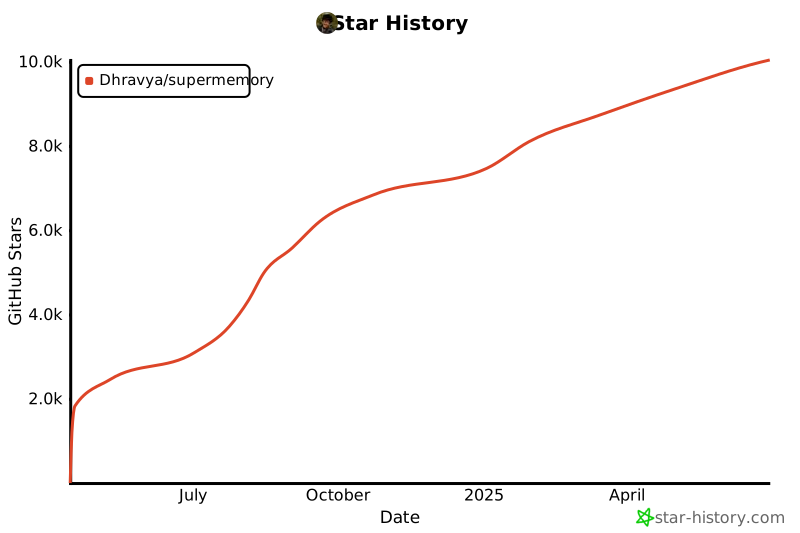
## Star History
[](https://star-history.com/#Dhravya/supermemory&Date)
## Contribute or self host
Supermemory is design to be set up easily locally and super duper easy to set up 💫
Please see the [SETUP-GUIDE.md](SETUP-GUIDE.md) for setup instructions.
### Contributing
Contributions are very welcome! A contribution can be as small as a ⭐ or even finding and creating issues.
<a href="https://github.com/Dhravya/SuperMemory/graphs/contributors">
<img src="https://contrib.rocks/image?repo=Dhravya/SuperMemory" />
</a>
|