diff options
| author | Dhravya Shah <[email protected]> | 2025-03-23 20:18:37 -0700 |
|---|---|---|
| committer | Dhravya Shah <[email protected]> | 2025-03-23 20:18:37 -0700 |
| commit | f8dfb87604583a21840eaca2dd5542d77f5a8463 (patch) | |
| tree | 92502017e6661584e7692c2ad84d587c32136961 /apps/docs/essentials | |
| parent | Merge branch 'main' of github.com:supermemoryai/supermemory (diff) | |
| download | supermemory-f8dfb87604583a21840eaca2dd5542d77f5a8463.tar.xz supermemory-f8dfb87604583a21840eaca2dd5542d77f5a8463.zip | |
Documentation edits made through Mintlify web editor
Diffstat (limited to 'apps/docs/essentials')
| -rw-r--r-- | apps/docs/essentials/architecture.mdx | 59 | ||||
| -rw-r--r-- | apps/docs/essentials/distinguishing-users.mdx | 86 | ||||
| -rw-r--r-- | apps/docs/essentials/metadata-filtering.mdx | 78 |
3 files changed, 78 insertions, 145 deletions
diff --git a/apps/docs/essentials/architecture.mdx b/apps/docs/essentials/architecture.mdx deleted file mode 100644 index c23b74e2..00000000 --- a/apps/docs/essentials/architecture.mdx +++ /dev/null @@ -1,59 +0,0 @@ ---- -title: "How Supermemory works" -description: "A short guide to how Supermemory works" -icon: "toolbox" ---- - -Supermemory is a hosted service. This means that you don't need to worry about the infrastructure. - -but it's still good to know how it works. - -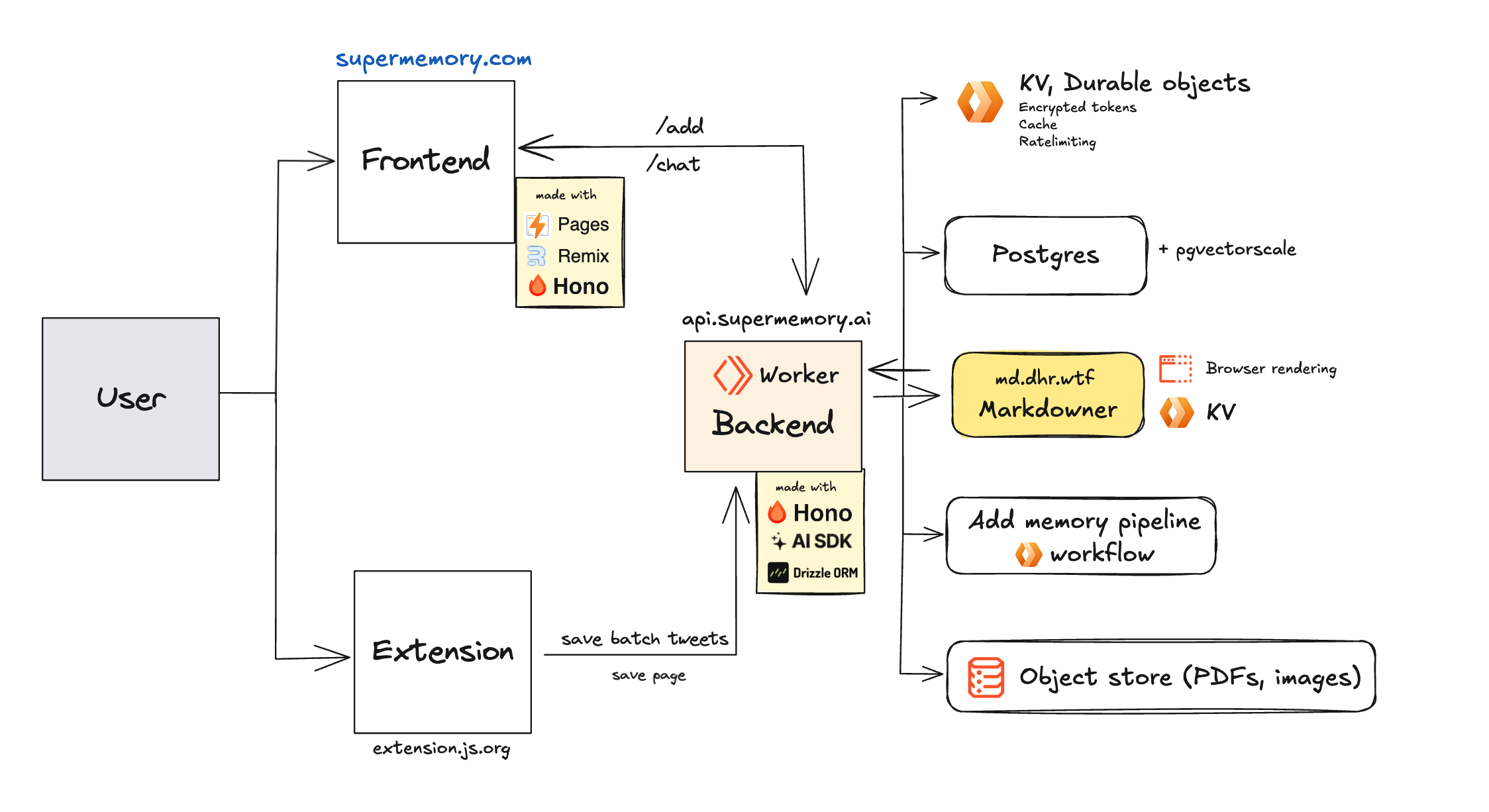 - -Supermemory has three main modules, managed by [turborepo](https://turbo.build): - -#### `apps/web`: The main web UI. - -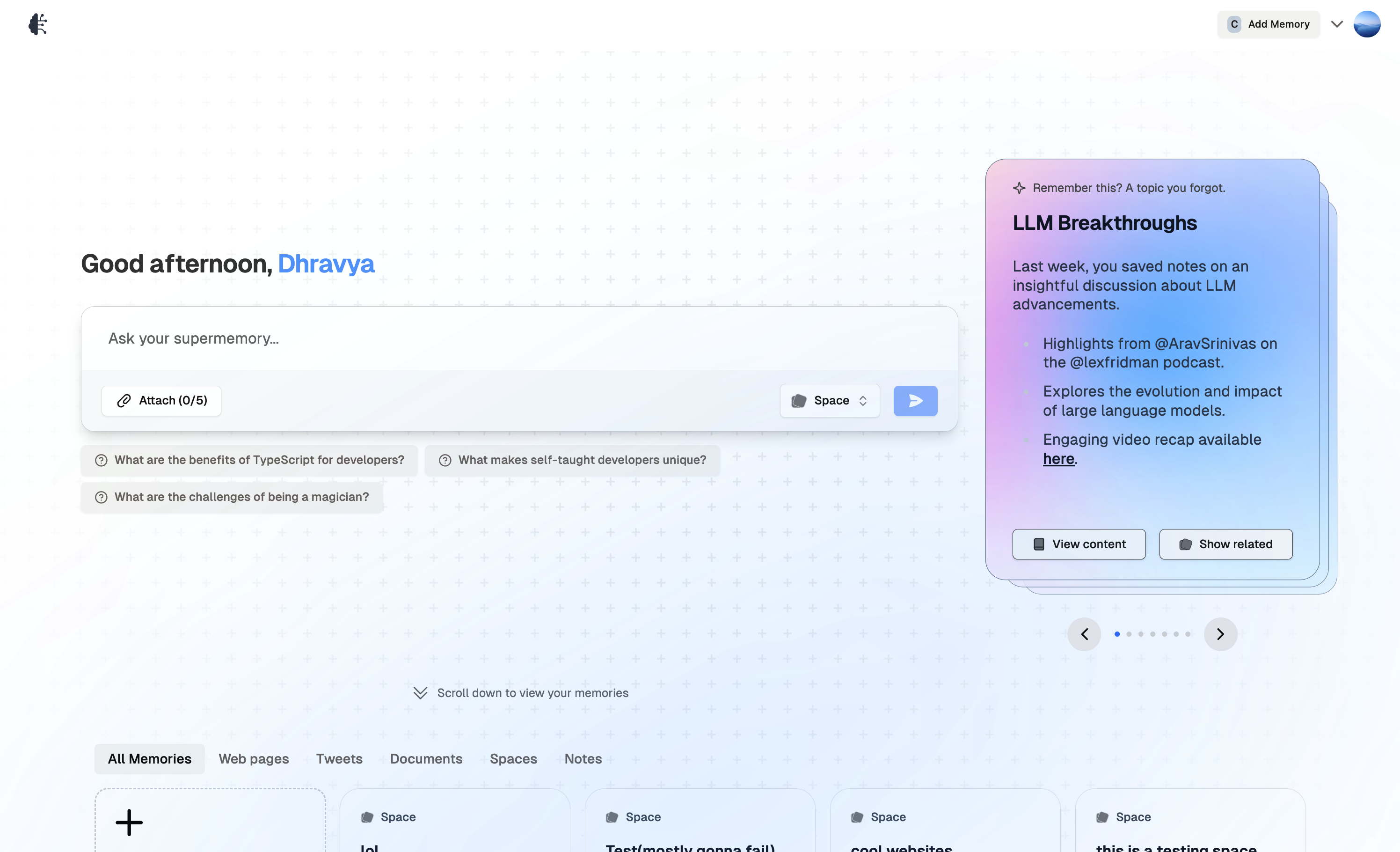 - -Built with: - -- [Remix](https://remix.run/) -- [Hono](https://hono.dev/) -- [authkit-remix-cloudflare by Supermemory](https://github.com/supermemory/authkit-remix-cloudflare) -- [Drizzle ORM](https://drizzle.team/) -- [TailwindCSS](https://tailwindcss.com) -- [shadcn-ui](https://ui.shadcn.com) -- And some other amazing open source projects like [Plate](https://platejs.org/) and [vaul](https://vaul.emilkowal.ski/) -- Hosted on [Cloudflare Pages](https://pages.cloudflare.com/) - -#### `apps/extension`: Chrome extension - -The [chrome extension](https://supermemory.ai/extension) is one of the most important part of the setup, but is not required.This is to easily add pages to your memory. - -<img - width="290" - alt="image" - src="https://camo.githubusercontent.com/118b58b867eacccde8a316e6e791a1d095fc82d83489813b9d59549d673becf4/68747470733a2f2f692e6468722e7774662f722f436c6970626f6172645f4a616e5f32302c5f323032355f61745f342e3035e280af504d2e706e67" -/> - -> please rate the extension to improve the rating 🙏. - -Built with: - -- [Extension JS](https://extension.js.org) -- [TailwindCSS](https://tailwindcss.com) -- [React](https://react.dev/) - -#### `apps/backend`: This module handles the vector store and AI response generation - -This is where the magic happens! -Built with: - -- [Cloudflare Workers](https://workers.cloudflare.com/) -- [Postgres + Pgvector with Pgvectorscale](https://github.com/timescale/pgvectorscale) -- [Cloudflare Workflows](https://developers.cloudflare.com/queues/) -- [R2 Object storage](https://developers.cloudflare.com/r2/) -- [Markdowner by Supermemory](https://md.dhr.wtf) -- [Cloudflare KV](https://developers.cloudflare.com/kv) -- [mem0](https://app.mem0.ai) diff --git a/apps/docs/essentials/distinguishing-users.mdx b/apps/docs/essentials/distinguishing-users.mdx deleted file mode 100644 index 28c7167f..00000000 --- a/apps/docs/essentials/distinguishing-users.mdx +++ /dev/null @@ -1,86 +0,0 @@ ---- -title: "Managing Multi-User Search Results" -description: "Learn how to handle search results for different users in Supermemory" -icon: "users" ---- - -When building multi-user applications with Supermemory, you'll often need to manage data for different users accessing the same account. Here's everything you need to know about handling multi-user scenarios: - -## What are Spaces? - -Spaces are Supermemory's way of organizing and separating data for different users or groups. They help you: - -- Keep each user's data separate and organized -- Group related content together -- Manage access control efficiently -- Scale your application to multiple users - -## How to Use Spaces - -**Creating Spaces** - -- Spaces are automatically provisioned when you use the `spaces` parameter -- No separate setup or initialization needed -- Example API call: - -```bash -curl -X POST https://api.supermemory.ai/v1/add \ - -H "Authorization: Bearer YOUR_API_KEY" \ - -H "Content-Type: application/json" \ - -d '{"content": "This is the content of my first memory.", "spaces": ["user1", "user2"]}' -``` - -## Manually Creating Spaces - -You can also manually create spaces by using the `/spaces/create` endpoint. - -```bash -curl -X POST https://api.supermemory.ai/v1/spaces/create \ - -H "Authorization: Bearer YOUR_API_KEY" \ - -H "Content-Type: application/json" \ - -d '{"spaceName": "user1", "isPublic": false}' -``` - -Creating a public space will make it globally accessible to all users. By default, spaces are private. - -## Retrieving Spaces - -You can retrieve all spaces for a user by using the `/spaces` endpoint. - -```bash -curl -X GET https://api.supermemory.ai/v1/spaces/list \ - -H "Authorization: Bearer YOUR_API_KEY" -``` - -## Moving a content to a Specific Space - -You can move a memory to a specific space by using the `space/addContent` endpoint and specifying the space id and the document id. - -```bash -curl -X POST https://api.supermemory.ai/v1/space/addContent \ - -H "Authorization: Bearer YOUR_API_KEY" \ - -H "Content-Type: application/json" \ - -d '{"spaceId": "123", "documentId": "456"}' -``` - -## Retrieving Content from a Specific Space - -You can retrieve content from a specific space by using the `/memories` endpoint and specifying the space id. - -```bash -curl -X GET https://api.supermemory.ai/v1/memories \ - -H "Authorization: Bearer YOUR_API_KEY" \ - -H "Content-Type: application/json" \ - -d '{"spaceId": "123"}' -``` - -This also means that you can augment multiple spaces together to create a more complex search. - -```bash -curl -X GET https://api.supermemory.ai/v1/search \ - -H "Authorization: Bearer YOUR_API_KEY" \ - -H "Content-Type: application/json" \ - -d '{"spaces": ["person", "project", "team"], "query": "my query"}' -``` - -This will filter only for memories that are in all three spaces - `person`, `project`, and `team`.
\ No newline at end of file diff --git a/apps/docs/essentials/metadata-filtering.mdx b/apps/docs/essentials/metadata-filtering.mdx new file mode 100644 index 00000000..3ac4e6a7 --- /dev/null +++ b/apps/docs/essentials/metadata-filtering.mdx @@ -0,0 +1,78 @@ +--- +title: "Managing Multi-User Search Results" +description: "Learn how to handle search results for different users in Supermemory" +icon: "users" +--- + +When building multi-user applications with Supermemory, you'll often need to manage data for different users accessing the same account. + +You might also want filters, like memories from **_multiple users_**, or in a certain **_time range_**, or products within a certain price category. + +You can do all this filtering using Supermemory's api. + +Here's a quick example + +```json [expandable] +{ + "AND": [ + { + "filterType": "numeric", + "key": "timestamp", + "value": "1742745777", + "negate": false, + "numericOperator": ">" + }, + { + "key": "group", + "value": "jira_users", + "negate": false + }, + { + "OR": [ + { + "key": "team_name", + "value": "engineering", + "negate": false + }, + { + "key": "org_name", + "value": "supermemory", + "negate": false + } + ] + } + ] +} +``` + +You can compose these conditions together to add filtering: + +- `AND` +- `OR` +- `numeric` (greater than / less than) + +Here's an example call: + +```bash +curl --location 'https://v2.api.supermemory.ai/search' \ +--header 'x-api-key: supermemory_RXPx' \ +--header 'Content-Type: application/json' \ +--data '{ + "q": "How to use teamcity to set up a project?", + "limit": 10, + "filters": { + "AND": [ + { + "key": "book", + "value": "maths", + "negate": false + }, + { + "key": "author", + "value": "r.d. sharma", + "negate": false + } + ] + } +}' +```
\ No newline at end of file |