diff options
| author | Christopher Gwynn <[email protected]> | 2021-05-16 00:26:26 -0400 |
|---|---|---|
| committer | GitHub <[email protected]> | 2021-05-16 00:26:26 -0400 |
| commit | 4bc4366ef3d46cf9668d444de868051b939ccf05 (patch) | |
| tree | 9464e1083c12a3097e021ee4f9b10fdea0a72970 | |
| parent | auto updates (diff) | |
| download | wizard101-rpc-master.tar.xz wizard101-rpc-master.zip | |
| -rw-r--r-- | README.md | 42 |
1 files changed, 19 insertions, 23 deletions
@@ -1,42 +1,38 @@ -# Wizard101 RPC +# Wizard101-RPC >The best way to show Wizard101 in-game stats on your Discord profile -If you're anything like me, you play a lot of wiz, and you use discord. The only issue is Kingsisle hasn't done much in terms of Discord integration, and previous solutions no longer work. Wizard101 RPC will read health and zone information from logs provided by Wizard101 and display them on your Discord profile. +If you're anything like me, you play a lot of wiz, and you use discord. The only issue is Kingsisle hasn't done much in terms of Discord integration, and previous solutions no longer work. Wizard101-RPC is a console app that will read health and zone information from logs provided by Wizard101 while you play, and display them on your Discord profile. 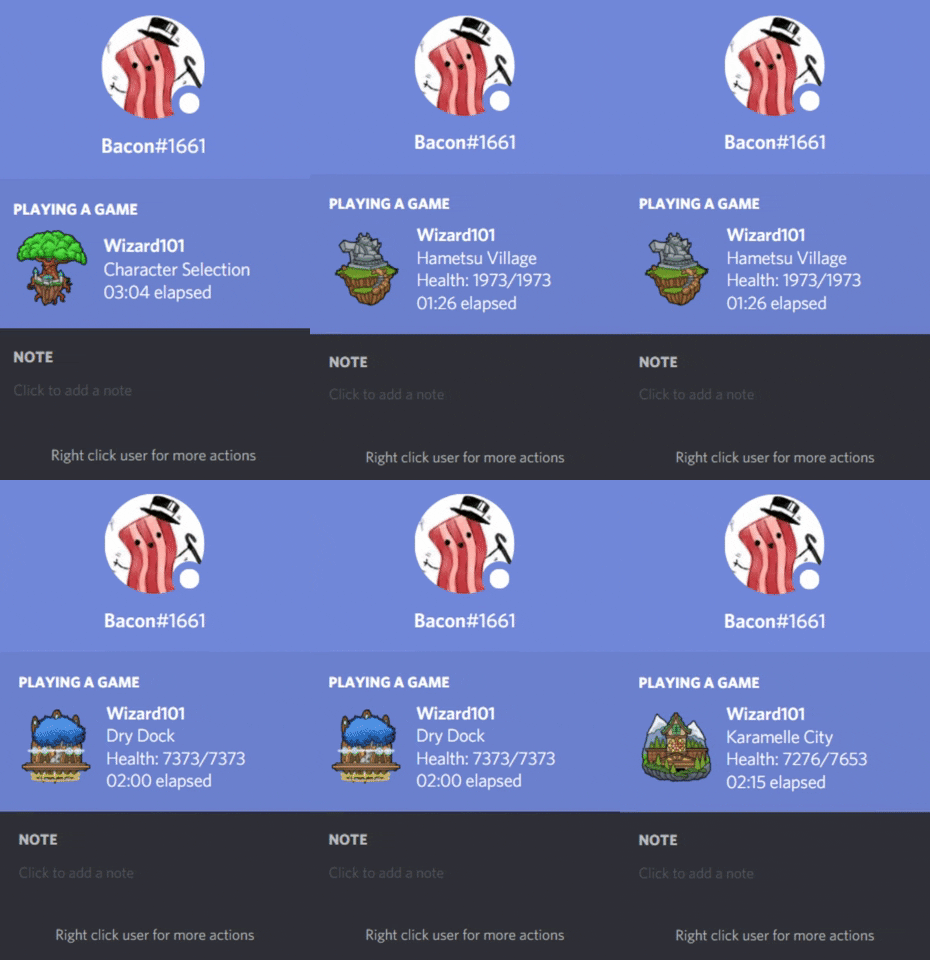 ## Installation -~~A compiled version can be found on the releases page here.~~ +A compiled version can be found on the releases page [here](https://github.com/Bacon1661/wizard101-rpc/releases). Only Windows is supported at this moment. Other platforms can be easily ported over though, and will be soon! -~~Unfortunately, I don't have the money to sign anything, so you may get a message from windows on only the initial launch stating, "Windows protected your PC." If this happens, click "More info" and then "Run anyway". Always check files you don't trust with tools like [virustotal.com](https://www.virustotal.com/) and Windows Defender. I have submitted this app to Microsoft for malware analysis to hopefully resolve this.~~ - -Things todo before a binary is released: -- Update zones.json automatically -- Try a non-deprecated Discord RPC module. - -## Usage -After finding a valid path and having successfully connected to your Discord client, Wizard101 RPC will show information on your profile while running. Please note that you must have Discord installed. Only the standard version of Discord has been tested. Other versions are expected to work, but not guaranteed. - -Wizard101 RPC has the ability to run Wizard101 (even quick launch) on startup. This way you can run Wizard101 RPC instead and have rich presence automatically working. +Unfortunately, I don't have the money to sign anything, so you may get a message from windows on the initial launch stating, "Windows protected your PC". If this happens, click "More info", then "Run anyway", and it shouldn't happen again. Always check files you don't trust with tools like [virustotal.com](https://www.virustotal.com/) and your preferred antivirus. ### Initial Startup -For Wizard101 RPC to work it must be able to read logs Wizard101 provides. Therefore, it must know where Wizard101 is installed. Two places will be checked initially: +For Wizard101-RPC to work, it must be able to read logs Wizard101 provides. Therefore, it must know where Wizard101 is installed. Two places will be checked initially: - The default location `C:\ProgramData\KingsIsle Entertainment\Wizard101` - The default Steam location `C:\Program Files (x86)\Steam\steamapps\common\Wizard101` -If a log file can't be found where expected from these locations, you will be prompted to enter a valid path before Wizard101 RPC will work. The entered path must lead to the Wizard101 folder, just as the default ones above. +If a log file can't be found where expected from these locations, you will be prompted to enter a valid path before Wizard101-RPC will work. The entered path must lead to the Wizard101 folder, just as the default ones above. + +The startup setting will default to `quick`, meaning Wizard101 will quick launch when Wizard101-RPC starts. See the Commands section to change this. + +## Usage +After finding a valid path and having successfully connected to your Discord client, Wizard101-RPC will show information on your profile while running. Please note that you must have Discord installed. Only the standard version of Discord has been tested. Other versions are expected to work, but it's not guaranteed. -The startup setting will default to `quick`, meaning Wizard101 will quick launch when Wizard101 RPC starts. +Since Wizard101-RPC must run while you play, it has the ability to run Wizard101 (even quick launch to skip patching) on startup. This way you don't have to run two seperate programs when you want to have rich presence work while you play. ### Commands You can type in commands to change various settings. Type in the command name followed by an expected value. - #### `path <path to wizard101>` - - Change the path of where Wizard101 RPC will read information from if valid - - default: default location, if it exists + - Change the path of where Wizard101-RPC will read information from if valid + - default: A default location, if it exists - example: `path D:\Steam\steamapps\common\Wizard101` - #### `startup <quick|normal|none>` - - Sets how Wizard101 will launch when Wizard101 RPC is started + - Sets how Wizard101 will launch when Wizard101-RPC is started - quick: quick launch (skip patching, instant login screen) - normal: normal launch - none: will not launch @@ -47,13 +43,13 @@ You can type in commands to change various settings. Type in the command name fo Feel free to DM me on Discord at Bacon#1661. If you prefer, or you believe you found a bug, you can open an issue instead. ## Roadmap -As mentioned above in "Installation", there are priorities set before launch. Some other ideas to consider for the future in descending importance: -- MacOS and Linux support (If you use either of these and would like to help test please contact me) +Some ideas to consider for the future in descending importance: +- MacOS and Linux support (Looking for MacOS test subjects, DM me!) - Additional commands to let users customize the app, such as if to close when the game closes, how often information is retrieved from the logs, customization of rich presence elements, etc.. -- A GUI with Electron (not needed with a simple program like this, a lot of work, probably won't happen unless there's enough demand). +- A GUI with Electron. Arguably not needed with a simple program like this. Probably won't happen unless there's a good enough demand. ## Contributing Pull requests are welcome. For major changes, please open an issue first to discuss what you would like to change. ## License -[MIT](https://choosealicense.com/licenses/mit/)
\ No newline at end of file +[MIT](https://choosealicense.com/licenses/mit/) |