---
title: Typesafe JavaScript Chaining with OCaml and BuckleScript
route: /js-ocaml-chaining
date: 2017-08-19
description: Let's write some concise OCaml code to interface with JavaScript libraries that have a chainable API.
---
In my [previous article](/js-ocaml-microservices), we explored how BuckleScript
allows you to turn OCaml code into readable JavaScript, and how to interface
with other modules in the JavaScript ecosystem.
Today I’d like to continue on this path and show you the awesome
`@@bs.send.pipe` binding attribute, which enables us to write concise OCaml code
to interface with JavaScript libraries that have a chainable API.
---
### Exhibit A: Express
To interface with the [express](https://expressjs.com/) Node.js web framework,
we may write the following bindings in `src/FFI/Express.ml`. _(NOTE: Remember to
include _`src/FFI`_ in the _`sources`_ field of _`bsconfig.json`_!)_
type app
external express : unit -> app = "" [@@bs.module]
external listen : app -> int -> unit = "" [@@bs.send]
type req
type res
external get : app -> string -> (req -> res -> res) -> unit = "" [@@bs.send]
external send : res -> string -> res = "" [@@bs.send]
Then, in `src/index.ml` we could use this code as follows:
open Express
let app = express ();;
get app "/" (fun _ -> fun res ->
send res "Hello, world! Page 2");;
get app "/page" (fun _ -> fun res ->
send res "Hey Go back");;
listen app 1337;;
Running `bsb` results in the following `lib/js/src/index.js`:
// Generated by BUCKLESCRIPT VERSION 1.8.2, PLEASE EDIT WITH CARE
'use strict';
var Express = require("express");
var app = Express();
app.get("/", (function (_, res) {
return res.send("Hello, world! Page 2");
}));
app.get("/page", (function (_, res) {
return res.send("Hey Go back");
}));
app.listen(1337);
exports.app = app;
/* app Not a pure module */
Nice! We can run `node lib/js/src/index.js` and get ourselves a running express
server.
### The Chaining Express API
Consider the type we wrote for the `Express.get` function:
external get : app -> string -> (req -> res -> res) -> unit = "" [@@bs.send]
`get` takes an `app` representing our express instance, a `string` for the path,
a function (which takes a request and response), and returns a no-op (type
`unit`).
However — did you know we can _chain_ this API like so? In JavaScript:
app
.get("/", (req, res) => res.send("Hello, world!"))
.get("/about", (req, res) => res.send("About ..."))
.listen(1337)
This pattern is very common in JS, and works in the following way: instead of
`get` accepting an `app` and returning a `unit` (or no-op), we return another
`app` which we can then use on a subsequent `get`!
That’s a lot to unpack, so let’s demonstrate how to get from A to B in code.
#### Step 1: Take an app, return an app
external get : app -> string -> (req -> res -> res) -> app = "" [@@bs.send]
let f: app = get (express ()) "/" index;;
let g: app = get f "/about" about;;
listen g 1337;;
So what’s different here? First, we changed the return type of `get` from a
`unit` to an `app`. Next we remove the definition for `app` and inline `express ()` in `f` directly.
Then, instead of using `app` as the first argument for our second call to `get`,
we pass in `f`. This is type-safe (remember: `f`, `g`, and `express ()` all have
the same type) and sure enough if we compile this script and run it — we get a
working Express app!
In fact, if we wanted to, we could start combining some of these lines by
inlining the definition for `f` entirely like so:
let g: app = get (get (express ()) "/" index) "/about" about;;
listen g 1337;;
Or a step further, inlining `g` as well:
listen
(get
(get (express ()) "/" index)
"/about"
about)
1337
These two examples are _identical_ to the first, but notice that `app` is only
referenced once in our code. Let’s peek at BuckleScript’s output
`lib/js/src/index.js`:
Express().get("/", index).get("/about", about).listen(1337);
🔗🔗🔗🔗🔗🔗🔗🔗!!!
See, once we smush together our `get` and `listen` calls, there’s no need for
temporary variables like `f` and `g`. BuckleScript knows this, and merely puts
everything inline for us — in a “chained” manner.
This may start to look a little LISP-y to you, and that’s fair — this syntax is
not easier to read than our original example which specifies `app` multiple
times. Let’s move on and see how we can clean up this code a little.
#### Step 2: Some light plumbing, and a leak
As we start composing functions (like we did by inlining `f` and `g` in the
previous section), we’ll start to see quite a bit of parentheses. Consider the
following bit of code:
apply_discount(
(get_age_group(get_age(user_from_id(id))))
price)
Sure we can dress this up with further indentation, but developers reading this
code will still construct a sort of “stack” in their head as they read the
subsequent functions from left to right (_“Okay apply discount of the age group
of the age of the…”_)
To remedy this, OCaml provides the infix `|>` (or “pipe”) operator. We can
inspect its type via `utop` :
utop # (|>);;
- : 'a -> ('a -> 'b) -> 'b =
We see that we take an item of type `a`, a function from `a` to `b` and return
an item of type `b`. \*_Exhale_ \*In code:
f(x) === x |> f
And if we were to use this pipe multiple times:
f(g(x)) === x |> g |> f
We can see here how the pipe operator (`|>`) allows us to unfold various layers
of function composition. It’s quite neat, and leads to some very readable code.
Let’s use it with our example above:
apply_discount(
(get_age_group(get_age(user_from_id(id))))
price)
(* turns into... *)
apply_discount(
(id |> user_from_id |> get_age |> get_age_group)
price)
How about that last layer? What if we wanted to unfold `apply_discount` as well?
let f = id |> user_from_id |> get_age |> get_age_group |> apply_discount;;
f price;;
Decent! However we hit a snag. `apply_discount` takes _two_ arguments, the
user’s age group, and a price (`group -> price -> total`). If we were to write
our code like so:
... |> get_age_group |> apply_discount price
We would receive a type error because `price` would be used as the _first_
argument to `apply_discount`. This means we need some parentheses (technically
you could use OCaml’s `@@`, but hold your horses), which we are trying to avoid!
(... |> get_age_group |> apply_discount) price
One way to fix this? **Just make **`price`** the first argument!**
#### Step 3: Save the app for last
If we were to redefine `apply_discount` from `group -> price -> total` to `price -> group -> total`, we could then remove our parentheses entirely:
... |> get_age_group |> apply_discount price
Now price is used as the first argument, and second argument (the age group)
makes its way to `apply_discount` from the pipeline.
“Jordan this is great but I don’t really care about discounts and age groups,
I’m trying to write a web server before my startup goes under.”
Well fear no more, let’s return to our express example from earlier.
listen
(get
(get (express ()) "/" index)
"/about"
about)
1337
If we were to swap in some `|>` operators, we’ll quickly run into the same exact
problem we had with `apply_discount`:
(((express () |> get) "/" index |> get) "/about" about |> listen) 1337
Notice how `|>` doesn’t really buy us much. Since an `app` type must be the
first argument to `get` and `listen`, we’re left with a confusing mix of
parentheses and `|>` operators.
As we learned in the previous section, our solution is to **move this argument
to the end**. Let’s try it with some helper functions:
let get_ route handler app = get app route handler
let listen_ port app = listen app port
And use ’em like so:
express () |>
get_ "/" index |>
get_ "/about" about |>
listen_ 1337
And voila! An `app` type makes it way from `express ()`, through the pipe and
onto the end of `get_ “/" index`. That method also returns an `app` type, which
finds its way at the end of `get_ “/about" about`, and so on and so forth. We
now have ourselves a beautiful, type-safe chain of functions that map to the
chainable express API.
Express().get("/", index).get("/about", about).listen(1337);
#### Step 4: BuckleScript can do this for us
Defining a `function_` for every `function` you bind to JavaScript-land doesn’t
sound all that exciting, though. Wouldn’t it be great if `get` and `listen`
could work like that for us? Well they can!
The current bindings for `get` and `listen` are defined using the `@@bs.send`
attribute as follows:
external listen : app -> int -> unit = "" [@@bs.send]
external get : app -> string -> (req -> res -> res) -> app = "" [@@bs.send]
However, BuckleScript also provides us with a `@@bs.send.pipe` which, you
guessed it, allows us to define functions that work well with the `|>` operator.
[From the docs](https://bucklescript.github.io/):
> `bs.send.pipe` is similar to `bs.send` except that the first argument, i.e,
> the object, is put in the position of last argument to help user write in a
> _chaining style_:
Here’s a modified binding for `get`:
external get : string -> (req -> res -> res) -> app = "" [@@bs.send.pipe: app]
The difference here is that the first `app` in the type definition has been
moved into the attribute, right after `@@bs.send.pipe:` . Here’s our new
definition for `listen`:
external listen : int -> unit = "" [@@bs.send.pipe: app]
Now, we can swap out `get_` and `listen_` in favor of their original
counterparts.
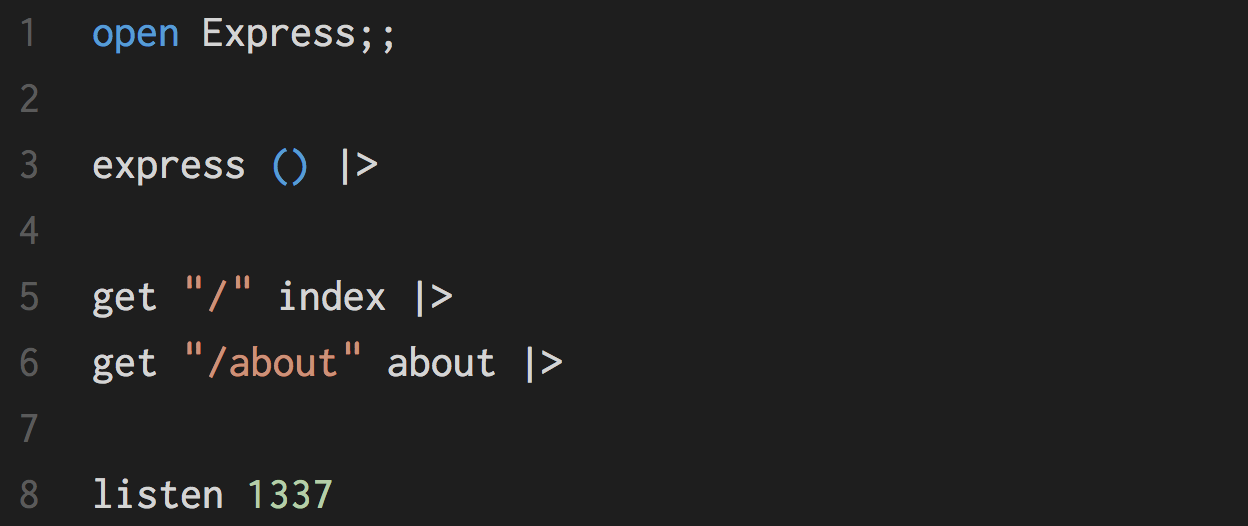
express () |>
get "/" index |>
get "/about" about |>
listen 1337
🎉🎉🎉🎉🎉🎉
---
### Closing Thoughts
Okay so that was a lot of words to tell you how `@@bs.send.pipe` works, but I
hope this post gave you a bit of intuition for why it exists and why you may
want to use it. With that, here a few more questions to ponder on:
- You may have noticed that the type of the callback for `get` is `req -> res -> res`. Why the second `res`? Well, express has
[operations](https://expressjs.com/en/4x/api.html#res.append) on `res` like
`send`, `status`, and `cookie` which are also chainable (they return a `res`
type). **Write chainable bindings for these methods.**
- Imagine `@@bs.send.pipe` did not exist and we were stuck with our old
definitions of `get` and `listen`: could we create a function called
`make_chainable` where `make_chainable get === get_` and `make_chainable listen === listen_`? **Why or why not?** _(As a hint: what if _`get`_ and
_`listen`_ both had three arguments, could we do it then?)_